Analytics: what is really happening to your weight
One weigh-in says nothing, and neither does one plate. Analytics turn weeks of entries into a few charts and say in words what each of them shows. They are computed once a day, at night.
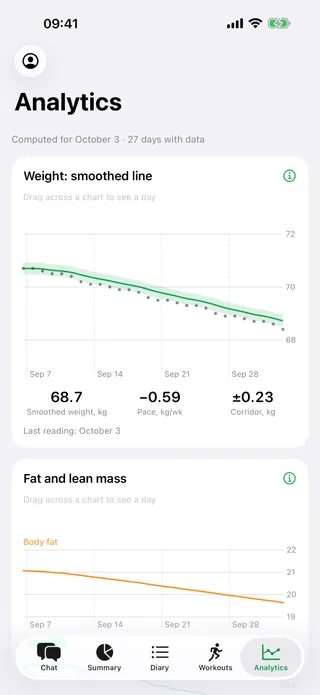
Weight: a smoothed line
The dots are single weigh-ins, the line is the smoothed weight: it does not jump with water and food. The band around it is the corridor of ordinary swings — a weigh-in inside it means nothing.
- The pace: how many kilograms a week, and which way
- The corridor: how much the weight wanders by itself
- Drag across the chart to see any day
Expenditure: computed against measured
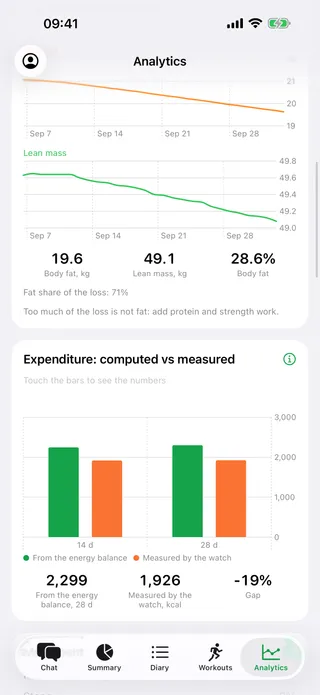
“From the energy balance” is what you really burn, judging by what you ate and how your weight moved. “Measured by the watch” is what the watch counted. The gap between them is shown next to both.
- Two windows: 14 and 28 days
- The gap as one number, in percent
- It tells you when some food seems to be missing from the diary
The figure from the energy balance appears once food is logged on at least half of the days in the window.
Movement
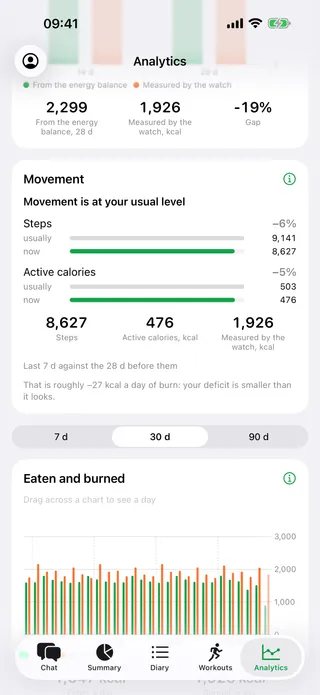
The last week against the month before it: how much you walked and how many active calories the watch counted. Workouts are counted separately.
- Steps and active calories: “usually” and “now”
- Roughly how much that adds to or takes from your daily burn
- It says so when the workouts are the same but everyday movement has dropped
Real screens of the app, light or dark to match your system. The numbers on them come from a demo account.
Also in analytics
-
Fat and lean mass
Worked out from the weight and the body-fat percentage of a smart scale. Such scales depend a lot on the water in the body, so it is the direction of the lines that matters, not single days. One line says what share of the loss was fat.
-
Eaten and burned
Day by day over 7, 30 or 90 days: how much was eaten, how much was burned, and the averages for the period.
-
Steps, sleep and resting heart rate
From Apple Health and the watch. Nights without the watch are skipped, not counted as zero, and today is left out of the average — it is not over yet.
-
When there is little data
Until there is enough history Kalorika says so and draws no line out of nothing. An average is not computed when too few days are logged.
Weight, fat and lean mass, expenditure, steps, sleep and heart rate are in both the iPhone app and the Mini App in Telegram. Steps, sleep, heart rate and active calories come from Apple Health — the iPhone app brings them.
Analytics in the iPhone app
Weight and expenditure are computed today, in the bot. Leave an address and we will write when the app is out.