Kalorika Open in Telegram

The Telegram bot and the iPhone app both work today

Take a photo of your food — Kalorika counts the calories and macros

Send a photo, a voice note, a line of text or a barcode, and the entry goes straight into your diary. Food, weight, water and workouts are all in one place. Kalorika can misread a photo, so you can correct any number.

App Store Try it in Telegram

Opens the bot in Telegram. It’s free, with nothing to install.

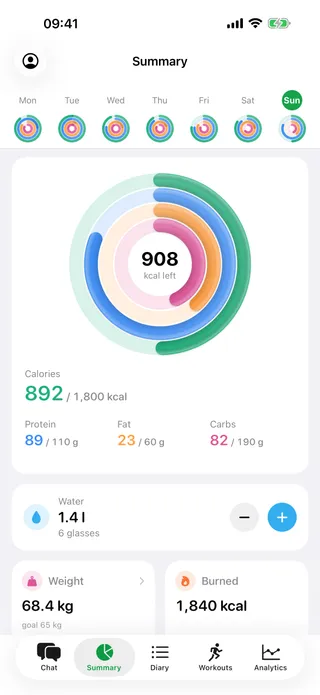
The day in one screen: a week of small rings on top, under it four large rings — calories, protein, fat and carbs — with the calories left in the middle, then water, weight and what was burned.
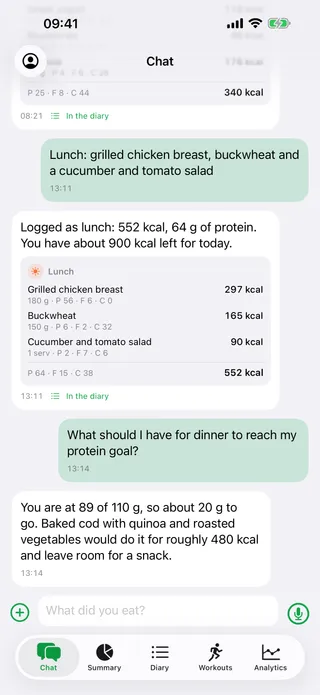
The chat: a lunch described in one line is logged as chicken breast, buckwheat and salad, 552 kcal, followed by an answer about how much protein is left for the day.

Who it is for

Sound familiar?

Three reasons people give up on a food diary — and what Kalorika does about each.

  • Counting calories takes too long?

    Snap the plate, send a voice note or type a few words, and the food is in your diary. “The usual” puts in your usual portion, and one line fixes a mistake: “it was 200 g”.

    See how it looks ↓

  • Little food, but the weight won’t move?

    Your weight is a smooth line with a weekly pace, without the jumps water makes. Ask in the chat “why is my weight stuck?” — Kalorika checks your food against your weight over the past weeks and names the reason.

    See how it looks ↓

  • One bad day, and the diary’s gone?

    The week counts, not one day: the weekly review shows the whole picture. No scolding — log it as it was and carry on in the morning.

    See how it looks ↓

Working with a nutritionist or a coach? With your consent they see your diary in Kalorika Coach →

How it works

Three steps and the day is logged

  1. Snap or describe your meal

    A picture of the plate, a few words, a voice note or the barcode on the pack — whichever is easier right now.

  2. Check the entry

    Kalorika suggests the dish, its weight, calories and macros. If something is off, fix it in a message or by hand, and the day’s totals update.

  3. See the day and the week

    How much of your target is left, where your weight is heading and what the week showed — no spreadsheets, no mental arithmetic.

What’s inside

Food, weight and movement in one diary

Six things people open Kalorika for every day. The screens show the iPhone app; the bot keeps the same entries and the same diary.

A meal logged in one message

Write “chicken breast, buckwheat and salad” and you get an entry with the weight, calories, protein, fat and carbs — and the day’s totals update at once.

  • A photo of the plate and voice notes — in the bot and in the iPhone app
  • A barcode: the scanner in the app, or a photo of the pack sent to the bot
  • “The usual” — one tap on a dish you have eaten before
Learn more →

The chat: a lunch described in one line is logged as chicken breast, buckwheat and salad, 552 kcal, followed by an answer about how much protein is left for the day.

The whole day on one screen

Four rings — calories, protein, fat and carbs — show how much of your target you have eaten, and the middle shows how many calories are left. There is nothing to add up yourself.

  • A row of small rings for the week on top: any day is one tap away
  • Water, weight, calories burned and the deficit on the same screen
  • Rings or the classic look — you choose in Settings

Learn more →

The day in one screen: a week of small rings on top, under it four large rings — calories, protein, fat and carbs — with the calories left in the middle, then water, weight and what was burned.

A diary by meal

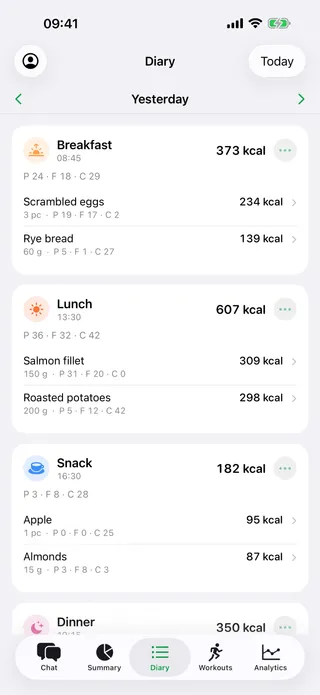
Breakfast, lunch, dinner and snacks: every entry has its time and its numbers.

  • Any past day opens the same way
  • Add what you forgot or delete what is wrong
  • The day’s totals update on their own

Learn more →

The diary for yesterday: breakfast, lunch and a snack, each with its own calories and macros, and the dishes listed under them.

Weight as a smooth line, not jumps

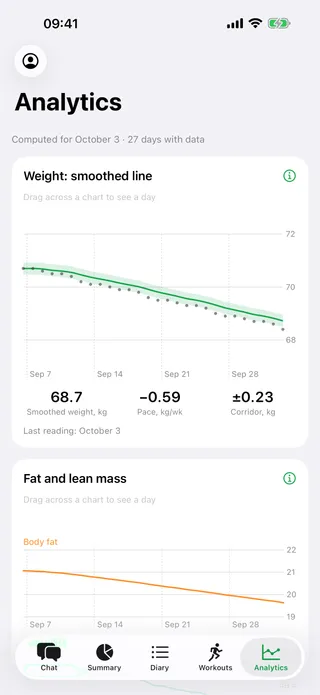
Weigh in whenever you like. Kalorika smooths the daily swings into one line and shows how much your weight changes per week.

  • The corridor: the range your daily swings stay in
  • It tells you plainly when the line has not moved for two weeks
  • An estimate of what you burn, from your own food and weight records

Learn more →

Analytics: the weight line smoothed over a month with its corridor and the pace per week, and the share of body fat below it.

The week, told in words

Once a week Kalorika tells you how much you ate on average, how much you burned, where the weight went and what to try next.

  • Five short questions about sleep, hunger and energy
  • A new daily target when the old one no longer fits
  • In Telegram on Sunday, in the app as a notification

Learn more →

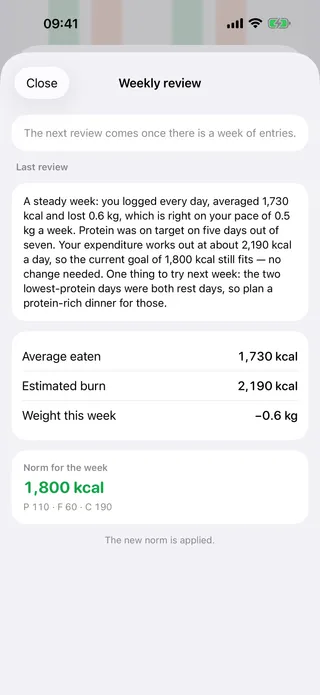
The weekly review: a paragraph about the week just gone, then the average eaten, the estimated burn and the change in weight, and the daily target for the week ahead.

Workouts alongside your food

Tell the chat about a workout or fill in a short form: what it was, how long it took, the exercises with sets, reps and weights.

  • Calories are worked out from your weight and marked as an estimate
  • On iPhone, workouts from Apple Health come in automatically
  • Calories burned show up in the day’s totals at once

Learn more →

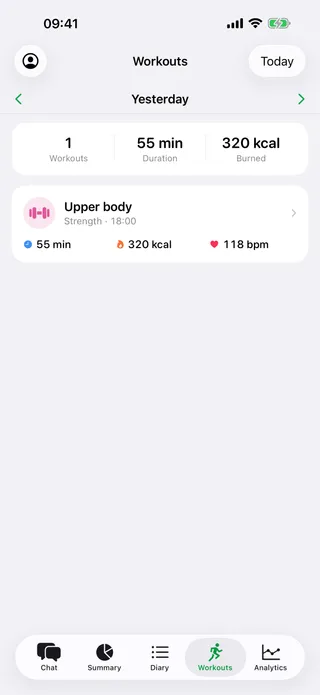
The workouts screen for yesterday: one strength session of fifty-five minutes and three hundred and twenty calories, with the average heart rate next to it.

Real screens of the app, light or dark to match your system. The numbers on them come from a demo account.

All features

iPhone and Apple Watch

On your wrist, only what you need

The app for iPhone and Apple Watch is on the App Store. It uses the same diary as the bot, and the watch shows only what you need in the middle of the day.

  • What is left for today, at a glance
  • A glass of water or a usual meal in one tap
  • Apple Health: weight, steps, energy and workouts — only with your permission
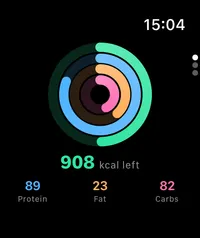
  • The watch screen: four rings — calories, protein, fat and carbs — and under them the calories left for today and three numbers: protein, fat, carbs.
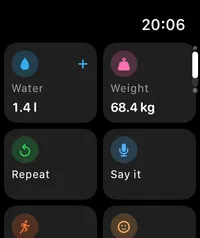
  • The watch screen with actions: add water, log weight, repeat a meal, dictate what you ate and start a workout.
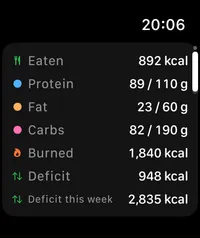
  • The watch screen with the numbers of the day: eaten and burned, protein, fat, carbs and water so far today.

Where it works

You can start today

  • Works today

    The Telegram bot

    Photo, voice, text and barcode, the diary, weight, water and the weekly review. Nothing to install.

  • Works today

    iPhone

    The same diary, a barcode scanner, Apple Health and a water widget on the home screen.

  • Works today

    Apple Watch

    Calories left for the day, water, usual meals and the five weekly-review questions — from the watch.

  • Coming soon

    Android

    The Android app is being tested now. Until then the Telegram bot works on Android just the same, with nothing to install.

What it costs

Kalorika is free: the diary, weight, water and analytics are available from day one. Recognising food from a photo, a voice note or text has a daily limit; a new account gets 90 days of full access once, with a higher limit. There is nothing to buy: we are not selling anything at the moment.

Try it in Telegram

To be honest

Worth knowing before you start

  • A photo is an estimate

    A picture cannot weigh food. Kalorika tells you when it is unsure, and you can correct the dish and the weight — the day’s totals update. For a single product, Kalorika looks the numbers up in food tables: its own, the USDA database and Open Food Facts.

  • A diary, not a doctor

    Kalorika counts and shows. It gives no health advice — take those questions to a doctor.

  • The data is yours

    You can delete your account in the app settings: 30 days later everything is erased — the diary, the photos and the rest.

Questions

What people ask most

All problems and answers →

The photo was read wrong

Correct it in words: write “that was 200 g, not 100” or “it was chicken, not turkey”, and the entry is recalculated. You can also ask to re-check the photo. In the app you can edit an entry by hand. Photo recognition is an estimate, not a measurement — on a crowded plate it is wrong more often.

How do I start?

The bot in Telegram works right now: send a photo of the plate, a voice message or a barcode, and the entry lands in the diary. The iPhone app is on the App Store, with the same account.

How do Apple Health and the Watch work?

This is the iPhone app. It reads from Health only what you allow — weight, energy, steps, sleep, workouts — and writes your own entries back. Permission is given group by group, and revoking it in iOS settings stops new data at once. Whatever the Watch writes into Health arrives the same way. The Telegram bot has no connection to Health.

I cannot sign in

Request a password reset and open the link from the email — it expires quickly, so use the newest email. Nothing arrived? Check spam, then write to us from the address the account is registered to. If you sign in with Apple there is no password at all: the account is tied to your Apple ID.

How do I delete the account?

In the app: Settings → Delete account. Nothing is erased right away — the account is marked for deletion, every device is signed out, and 30 days later the diary, the photos and the rest are erased. Signing in or messaging the bot within those 30 days cancels the deletion. If you no longer have the app, or you only use the Telegram bot, write to the address above from the account’s e-mail or give your Telegram username, and we will delete the account by hand.

The app

Get the app

It is one diary everywhere: the app, the watch and the bot share one account, so start wherever you like.

App Store

For trainers and dietitians

A separate app, Kalorika Coach, is on the App Store: see a client’s diary with their consent and set their calorie and macro target. It is free for the specialist.

The day in one screen: a week of small rings on top, under it four large rings — calories, protein, fat and carbs — with the calories left in the middle, then water, weight and what was burned.